Calendar and channel manager
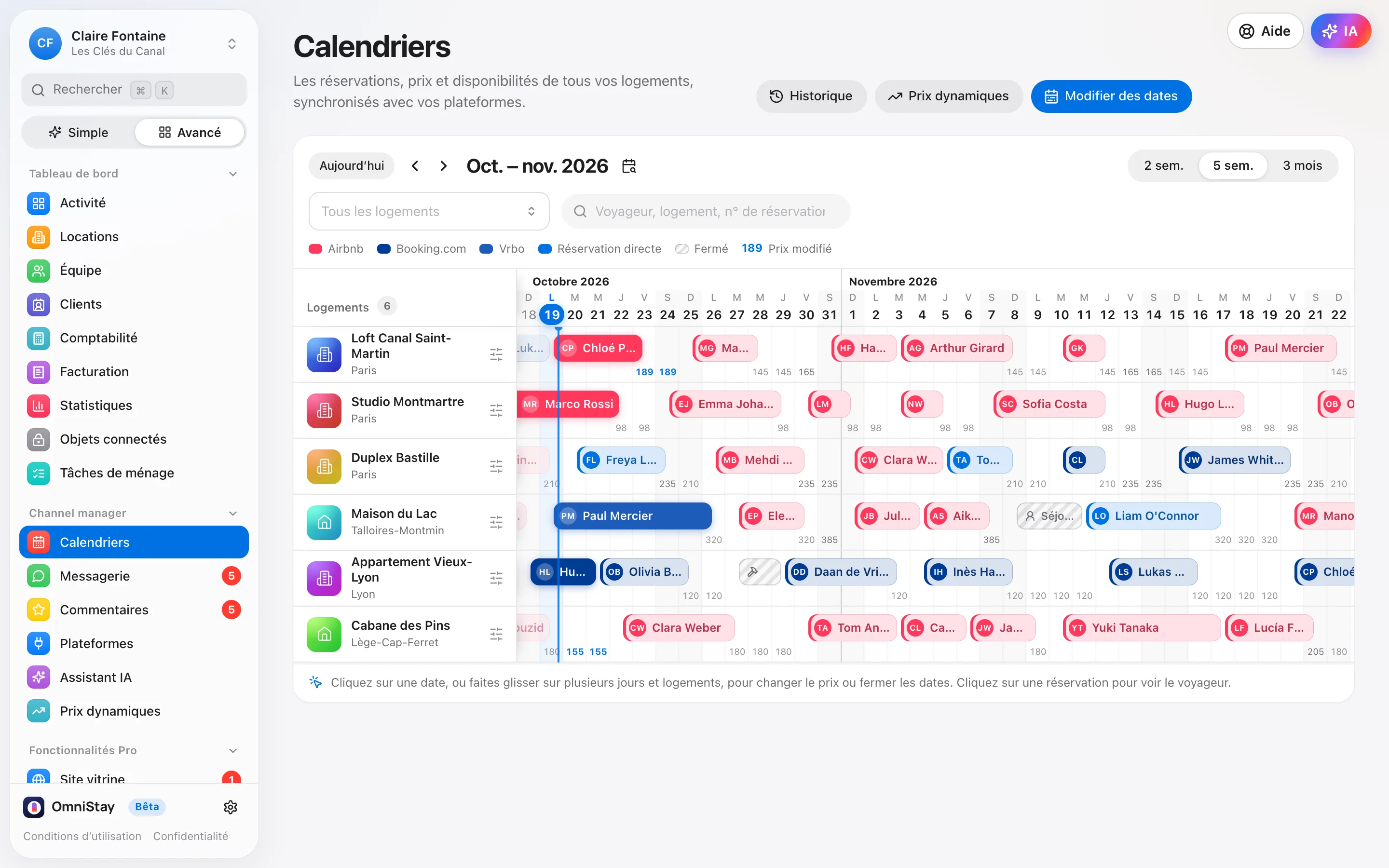
One calendar. All your platforms.
Bookings, prices and availability for all your listings, synced in real time with Airbnb, Booking.com, Expedia and Vrbo. A night sold somewhere closes everywhere: no more double bookings.
What OmniStay does
Your whole calendar, in one place.
-
Direct connection to the platforms
Airbnb, Booking.com, Expedia and Vrbo (Abritel) are connected directly: prices, availability, bookings and guest messages flow through OmniStay, both ways.
-
Your listings become your properties
Connect your Airbnb account: OmniStay reads your listings and creates your properties with their title, address, bedrooms, photos, description and amenities. A property that already exists is linked, with no duplicate.
-
Nothing is overwritten
Before connecting a listing, OmniStay reads its calendar: prices, minimum stays and closed nights are kept. You see what will be sent, compared with the listing, and nothing goes out before “Confirm and connect”.
-
Zero double bookings
A night booked on one platform closes instantly on the others. Existing bookings arrive in OmniStay, without a second welcome message to the guest.
-
Other sites through iCal
Gîtes de France, Leboncoin, Clévacances…: paste their iCal link. OmniStay rereads it every hour, closes the booked dates and gives you its own link to paste on their side.
-
Dynamic pricing with PriceLabs
Using PriceLabs? Its prices and minimum stays flow through OmniStay, listing by listing. If it stops sending prices, an alert lets you know.
A booking comes in: the checkout cleaning is created automatically and goes to your team.
In practice
Connected in a few minutes.
- 1Create your account in a few minutes.
- 2Connect your Airbnb account: your properties arrive with their photos, prices and bookings.
- 3Connect Booking.com, Vrbo and Expedia in the same place, then other sites through their iCal link.
- 4Check each property’s preview, then “Confirm and connect”: your calendar is up to date everywhere.
FAQ
Calendar and channel manager: your questions.
Are my listings changed when I connect OmniStay?
Not without your agreement. OmniStay first reads each listing’s calendar (prices, minimum stays, closed or booked nights), shows you what will be sent, compared with what the listing displays, and sends nothing before “Confirm and connect”. What you’ve polished in OmniStay, such as the title, the description or the photo order, is never overwritten.
How do I avoid double bookings with a site that has no direct connection?
Through its iCal link: OmniStay rereads it every hour and closes the dates booked on that site. An OmniStay booking on the same dates is flagged to you. The other way round, OmniStay gives you a link to paste on that site, so it closes the nights sold elsewhere.
Can I keep PriceLabs?
Yes. In the property details, hand its prices over to PriceLabs: its prices and minimum stays flow through OmniStay to the platforms. If PriceLabs stops sending prices, for example because there’s no payment method on your PriceLabs account, an alert lets you know.
And also
OmniStay’s other features.
Everything is in the same software, at €9.90 per listing per month. See the features from A to Z.
- Messages and reviews Messages that send themselves, in the guest’s language, and a single inbox. Explore
- AI assistantAdd-on It replies in the guest’s language, topic by topic, within the limits you set. Explore
- Cleaning and team Cleanings are created at every checkout and go straight to your team’s phones. Explore
- Owners and monthly invoices A portal for each owner, and their monthly invoices ready on the 1st. Explore
- Guest app and pre-check-in The welcome book, the code at the right time and pre-check-in, in one link. Explore
- Deposits and paymentsAdd-on Each guest’s card hold, placed and released automatically, commission-free. Explore
- Invoices and Factur-X Invoices, deposit invoices and credit notes in Factur-X, and the entries for your accountant. Explore